
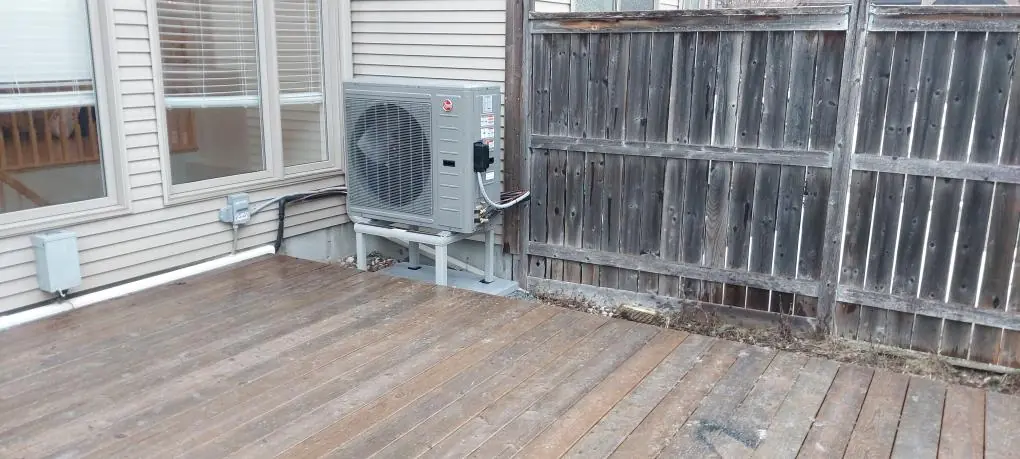
Use one folder and a short project index.
Create one property folder with sections for quotes, program correspondence, installation, payment and warranty records. Save original PDFs and emails. Cropped screenshots can omit terms, sender details or dates that you may need later.
Add an index with the property address, contractor contact, program, application reference and models. Share it with household members who arrange service.
Date files clearly and retain original and revised quotes so changes remain traceable.
Capture the baseline while the old equipment is still there.
HRS pre-installation submissions include photographs of the existing heating system and nameplates, an itemized work order, the participant agreement and the required sizing documentation. Your participating contractor manages the submission. Ask whether the necessary baseline records are complete before old equipment is removed.
For your own records, photograph labels that are accessible without opening equipment. Take a wide image showing the installation and a readable close-up of each visible nameplate. Include the furnace or air handler as well as the outdoor unit when they are part of the project.
Write down any equipment that is staying. An existing furnace, control or electrical component can be easy to forget when the final invoice highlights the new heat pump. The project record should make both the retained and replaced equipment understandable.
Keep the approval separate from the rebate estimate.
A contractor’s rebate estimate, application submission and program approval are three different records. HRS requires approval before installation, and the participant agreement makes payment conditional on written post-installation approval as well.
Ask for the application reference and a copy of the relevant status confirmation. File it next to the equipment quote so you can connect the approval with the proposed system. If you do not understand whether a message confirms submission or approval, ask the contractor to explain it before scheduling the work.
Also record the installation date agreed upon after the required approval. Clear dates help if a program later asks for clarification. Keep the full message with its sender and date, rather than a transcription that loses the context.
Document changes while they are being decided.
Equipment availability or a site condition may change the plan. If that happens, request an updated model list, scope and price before agreeing to the revision. Ask the contractor whether the program submission or approval needs to change too.
A verbal “equivalent model” does not give you enough information to check the system record. Keep the outdoor unit, indoor unit or coil, furnace or air handler where applicable, thermostat and relevant system reference together. This is especially helpful when several model suffixes look nearly identical.
After installation, compare the equipment labels with the revised documents. If you notice a difference, send the contractor a clear photo and ask for an explanation or correction. A paperwork correction is easiest when the people who installed the system still have the project details at hand.
The final invoice needs more than a total.
The sample invoice linked by HRS shows the information expected in a heat-pump record: participant and service address, contractor details, invoice number and date, itemized materials and labour, equipment models, the AHRI reference and applicable capacity details. It also shows an indication of payment for the post-installation submission.
Review the invoice before filing it away. Confirm your address and the equipment details, and ask for missing information to be added. Keep the receipt or payment confirmation with the invoice. If the project includes a rental agreement, preserve the complete signed agreement and its schedule.
The linked sample is explanatory guidance, rather than a substitute for current program documents. Use it to ask useful questions, then have the contractor confirm that the actual submission meets the requirements applicable to your file.
Request confirmation that the submission is complete.
The current HRS heat-pump requirements give the contractor 30 days after installation to submit the post-installation application. Ask for the submission confirmation and note any request for additional information. File the final outcome separately from the earlier pre-installation approval.
Do not assume the file is complete because the equipment is running or the contractor has been paid. Those are installation milestones. A program file has its own status, and a requested document may still need a response.
Keep a simple follow-up note with the reference number, date of your last contact and next agreed action. If you are waiting for an answer, that record makes the next conversation specific. Use the program’s official contact route when contractor correspondence does not resolve the status question.
Keep the useful records after the rebate arrives.
The HRS participant agreement requires eligibility records to be retained for at least two years from the pre-installation application. We also recommend keeping the core equipment, installation, warranty and service documents for as long as you own the system.
Save the manufacturer’s warranty certificate, any registration confirmation and the contractor’s written labour-warranty terms. They answer different questions. Add maintenance invoices and service reports as they occur so a future technician can see the equipment’s history.
When selling the home, prepare a concise equipment handover from the records you already have. Include models, installation date, operating instructions and service contacts. Check any warranty-transfer process with the manufacturer; a folder of receipts alone does not determine transfer eligibility.
Questions homeowners ask.
Does a rebate amount on my invoice prove approval?
No. Keep the program’s written status confirmations separately. A quoted amount or submitted application is not the same as approval.
What equipment details should I keep for future service?
Keep the outdoor and indoor model numbers, other equipment included in the system, installation date, invoice, warranty documents and contractor contact information.
Sources behind this article.
PUT THE GUIDANCE TO WORK
Find the next step for your home.
Check the Ontario program route first, then use the buying tools to organize your questions. Ottawa-area homeowners can choose an AirZone assessment when they are ready.